


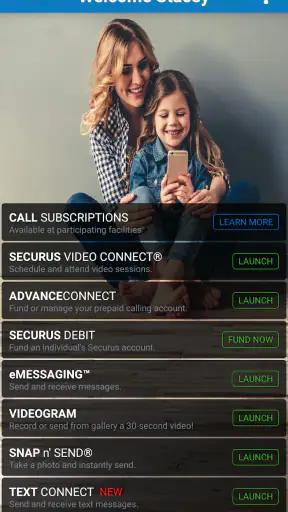


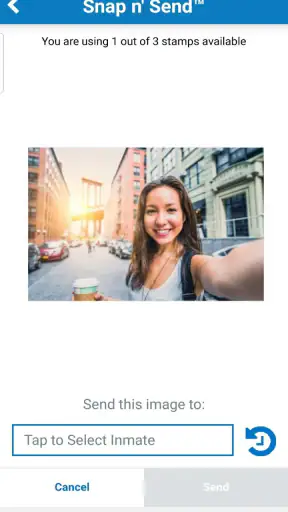
Keeping in touch through a correctional facility is not the same as using an ordinary messaging app. The timing is different, the available channels are more limited, and a missed appointment or unfunded account can interrupt communication at exactly the wrong moment. I found Securus Mobile useful because it brings several of those practical tasks into one place instead of making me manage calling arrangements and video visits as completely separate chores.
Developed by Securus Technologies, LLC, this free communication app is aimed at people who need to manage calling accounts and arrange video sessions connected with Securus services. That focus matters. It is not designed to replace WhatsApp, FaceTime, or a general-purpose social network, and judging it by those apps would miss the point. Its value comes from helping a specific kind of communication happen with fewer avoidable steps.
After spending time with it, my overall impression is positive but practical rather than enthusiastic. The app can make contact feel more organized, especially when several family members share responsibility for staying in touch. At the same time, it asks users to accept a more structured rhythm than they may be used to. You are not simply opening a chat whenever you feel like it; you are preparing for calls and video sessions within the limits of an institutional system.
Why Securus Mobile fits a different kind of communication
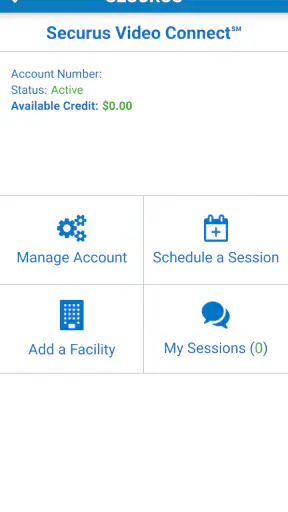
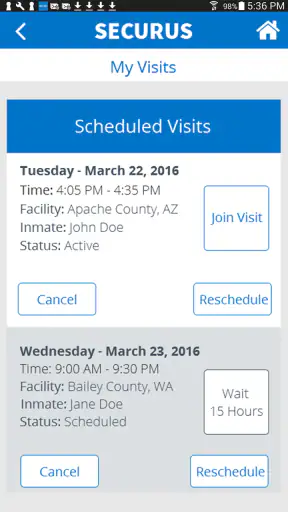
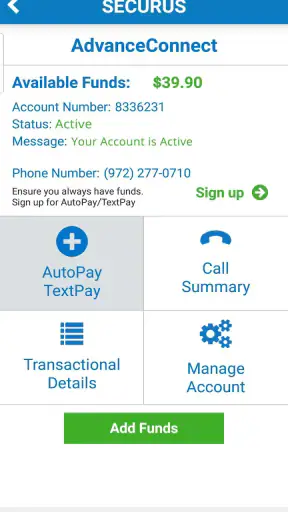
The first thing I would explain to a friend is that this is a coordination tool as much as a communication tool. The conversation itself may happen through a call or video session, but the app helps with the steps around that conversation: handling the calling account, preparing for a scheduled session, and joining when the time arrives.
That distinction changes how I use it. With a normal chat app, communication is continuous and casual. A message can be sent while cooking, answered later, and revisited without much planning. Here, the useful habit is to think ahead. Before a planned conversation, I would check the account situation and make sure I understood the session details rather than assuming everything would work automatically.
The biggest strength is reduced uncertainty around preparation. When communication depends on a scheduled video session, the minutes before it begins are not the best time to discover that an account needs attention or that I have forgotten the appointment. Keeping those tasks within the same mobile experience gives the process a clearer starting point.
The app has also earned a strong response from its audience, with a 4.7 average from roughly 36 thousand ratings and around 12 thousand written reviews. More than 5 million people have installed it, which suggests that it serves a substantial need rather than being a niche experiment. Those figures do not make every interaction effortless, but they do help explain why the app feels focused on a real, recurring problem.
Getting into a reliable routine
My preferred workflow is simple: open the app before I need contact, review the calling account, check the video-session information, and only then set aside time for the conversation. That order sounds obvious, but it changes the emotional tone of the experience. Instead of treating the app as an emergency button, I treat it as part of a communication routine.
This is particularly useful when more than one person in a family needs to coordinate. One person may be responsible for account management while another joins the video session. Having the relevant functions together makes it easier to agree on who is doing what. It does not remove the need for family coordination, but it reduces the chance that everyone assumes someone else handled the practical details.
A realistic example would be a relative planning an evening video visit after work. Rather than waiting until the scheduled time, I would use the earlier part of the day to review the account and confirm the session in the app. If something needs attention, there is at least a chance to deal with it before the conversation window begins. That small change protects the actual visit from being consumed by troubleshooting.
There is a useful trade-off here. Planning makes the communication feel less spontaneous, but it also makes it more dependable. For this kind of contact, I prefer dependable. A spontaneous message is convenient; a prepared video session can be more meaningful when opportunities to speak are limited.
How the conversation flow feels
The app’s role is strongest before and at the start of a video session. It helps me move from “I need to arrange contact” to “I am ready to join.” That is a different flow from a chat app, where the main screen usually revolves around an ongoing stream of messages and notifications.
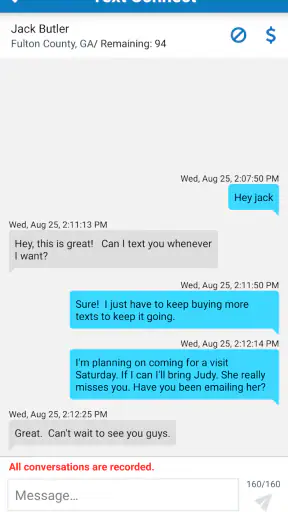
Because the emphasis is on calls and scheduled video sessions, I would not use it as my main place for casual conversation with friends or relatives outside the Securus system. It is too specialized for that. The advantage of specialization is that the important actions are easier to identify; the disadvantage is that the app does not become a general social hub.
I also appreciate that the app encourages a more deliberate conversation style. When a visit has a defined time, I am less likely to half-listen while switching between unrelated notifications. The appointment creates a boundary around the conversation. That can make the contact feel more intentional, even though the scheduling itself may require patience.
For someone who expects instant access, this rhythm may feel restrictive. The app cannot turn institution-based communication into an ordinary always-available call. It is better understood as a way to work within that structure with more clarity. If the user accepts that premise, the interface has a clear purpose. If the user wants open-ended messaging, the app will feel like the wrong tool from the beginning.
Attention, interruptions, and the cost of checking
Communication apps often compete for attention, but Securus Mobile creates a different kind of attention cost. The issue is not necessarily an endless feed; it is the mental effort of remembering that a call account and a video session may need separate attention before contact can happen. The app helps bring those responsibilities together, yet I still need to build the habit of checking it at the right time.
I found that a planned check is better than repeatedly opening the app throughout the day. Constant checking can make the communication feel like a source of tension rather than connection. My advice is to choose a sensible moment before the scheduled contact, review the relevant details once, and then return to the app only when it is time to join.
This is one of the less obvious benefits of using a specialized app: it can help contain the task. Instead of scattering account management across notes, emails, and memory, I can treat Securus Mobile as the place to handle the preparation. That does not eliminate waiting or uncertainty, but it gives those feelings a defined task to attach to.
There is also a downside. A dedicated app adds another digital responsibility to a person’s routine. Someone who already struggles to keep track of several services may find that the app is helpful only after learning its workflow. I would not recommend relying on memory alone. A personal calendar reminder for the planned session can be useful, while the app remains the place for the actual account and joining steps.
The current version is 5.2.0, build 5, and it requires at least iOS 11. That makes the operating-system requirement relatively approachable for users with older compatible Apple devices, although the experience still depends on the phone working well and the user being comfortable with scheduled digital contact. The app is rated for Teen users, which fits its communication purpose without suggesting that it is a children’s entertainment product.
Boundaries that make contact clearer
One of my strongest impressions is that the app makes boundaries visible. A scheduled video session has a beginning that I can prepare for and a limited context that I need to respect. That can be frustrating when life gets in the way, but it can also protect the conversation from becoming vague or continually postponed.
For families, this structure may encourage better expectations. Instead of promising to talk “sometime,” people can organize around the available session. I would tell users to communicate the plan clearly with everyone involved: who is joining, when they should be ready, and who will handle the account-related preparation. The app supports the process, but it cannot replace a shared plan.
The boundaries also have an emotional side. When contact is difficult to arrange, every failed attempt can feel disproportionately disappointing. Preparing early does not guarantee a perfect experience, but it reduces the avoidable mistakes that make an already sensitive situation harder. That is where I see the app’s practical value most clearly.
At the same time, I would not describe the structure as flexible. People who need to change plans frequently may find scheduled communication inconvenient. The app is a better match for users who can reserve time and follow a defined process than for those who expect to start a video call whenever both people happen to be free.
Where it stands beside familiar alternatives
Compared with WhatsApp or Messenger, Securus Mobile is narrower but more relevant for its intended setting. Those alternatives are excellent for informal text, voice, and video communication among people who can freely contact one another. They are not substitutes for an app built around Securus calling accounts and video sessions.
Compared with FaceTime, the difference is even clearer. FaceTime is designed to make a direct personal call feel immediate. Securus Mobile is designed around access and scheduling within a particular communication service. If my goal were a quick call with a friend, I would choose FaceTime or another general video app. If my goal were to organize contact through Securus, using a general alternative would not address the account and session workflow.
The comparison also explains the app’s limitations. It does not offer the broad social ecosystem, casual messaging habits, or effortless spontaneity that make mainstream communication apps attractive. In return, it gives the intended user a focused place to manage the specific kind of contact that those mainstream apps do not handle.
I would skip it if I have no need for Securus calling or video services, if I am looking for a normal chat application, or if my main requirement is unrestricted on-demand calling. Installing it “just in case” would add clutter without offering much value. The app earns its place when its specialized purpose matches the user’s situation.
Small habits that improve the experience
My first practical tip is to separate preparation from conversation. Check the calling account and session information before the appointment, not while the other person is waiting. This makes the actual visit feel less administrative and gives me time to notice a problem without sacrificing the entire conversation.
Second, I would avoid treating the app as the only reminder system. Use a calendar or a personal note for the time, then use Securus Mobile for the service-specific steps. That division is helpful because an app can manage the session, but a separate reminder can protect the appointment from being forgotten during a busy day.
Third, agree on a backup communication plan for ordinary family coordination. I do not mean replacing the Securus session; I mean deciding how relatives will tell one another about schedule changes or practical questions. Since this app is specialized, it should not be forced to serve as the family’s complete communication system.
Finally, keep expectations realistic. A successful app workflow cannot make a scheduled conversation as casual as sending a quick message. Its job is to make the available contact easier to organize. Once I stopped expecting it to behave like a mainstream messenger, its strengths became much easier to appreciate.
Who will appreciate it most
Securus Mobile is best for relatives and other approved users who regularly need to manage Securus calling accounts or join video sessions. It is especially useful for someone who prefers having those tasks in one focused app rather than searching through different processes each time contact is arranged.
It can also suit people who value clear communication boundaries. The scheduled nature of video contact encourages preparation, protects a block of attention, and makes the conversation feel like an event rather than another interruption. For families trying to maintain regular contact under difficult circumstances, that structure can be reassuring.
It is less suitable for users who want a complete messaging platform, instant informal calls, or a large set of social features. The app’s narrow purpose is not a flaw for its intended audience, but it is a decisive limitation for everyone else. I would rather see a user choose a simpler mainstream messenger when that is all they need than install this app expecting it to behave like one.
My final view after using it
Securus Mobile is most valuable when communication needs preparation, not just a connection button. It brings calling-account management and video-session access into a focused mobile experience, helping users protect their limited communication time from avoidable confusion.
I like the way it encourages a healthier rhythm: check the practical details, set aside attention, join the session, and keep the conversation separate from the rest of the day’s digital noise. That rhythm will not suit everyone, and the scheduled structure can feel rigid compared with ordinary chat and video apps. Still, rigidity is sometimes the reality of the communication being supported, and a tool that acknowledges that reality is more useful than one that pretends contact is always effortless.
For its intended audience, I would recommend giving it a try because it is free and purpose-built for this communication workflow. Just approach it as a coordination companion rather than a social network. If you need Securus services, want clearer preparation, and are willing to work within scheduled contact, it can make an important routine easier to manage. If you simply want spontaneous everyday messaging, choose a general communication app instead.


